
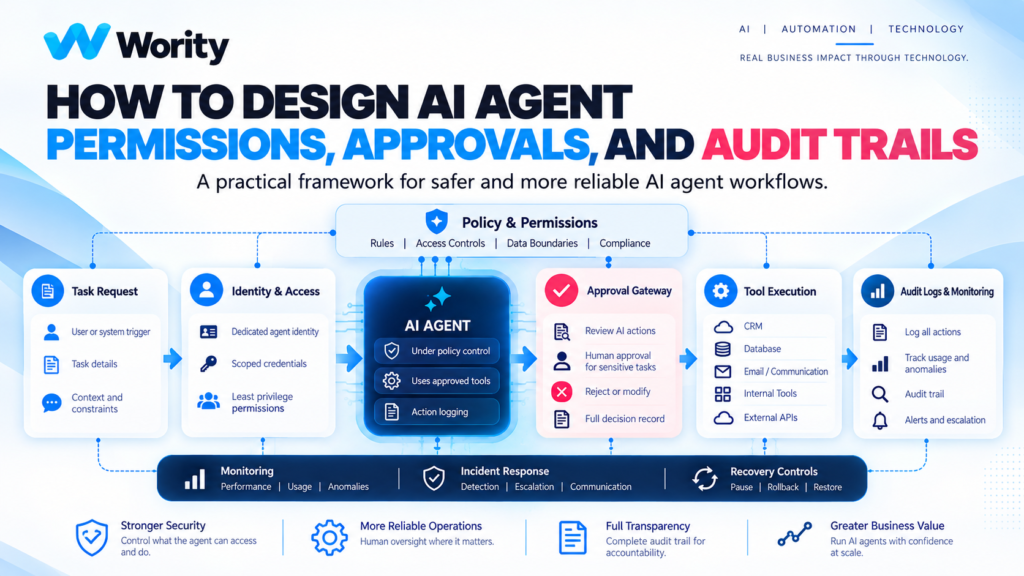
When an AI agent is connected to a business system, the permission model becomes part of the product design.
It is tempting to focus on the prompt, model, and tools. But an agent also needs a clear answer to a basic question: what is it allowed to do?
Without an explicit permission model, teams may grant broad access to make a prototype work quickly. That can create unnecessary risk when the prototype becomes part of a real workflow.
This guide explains how to structure permissions, approvals, and audit trails in a practical way. It is an architectural starting point, not a substitute for reviewing the security requirements of your specific systems.
Separate capability from authority
An agent may be technically capable of calling a tool. That does not mean the workflow should authorize it to do so.
For example, an agent might be able to draft a customer email. The business may decide that sending external messages requires approval. Similarly, an agent might retrieve an invoice record but should not be able to approve payment.
Design these decisions separately:
– Capability: what the software integration can technically do.
– Authority: what the agent is permitted to do in this task.
– Approval: what a human or policy engine must authorize.
– Evidence: what gets recorded to show what happened.
This separation helps avoid treating tool availability as blanket permission.
Step 1: Build an action inventory
List every tool action the agent may invoke. Avoid grouping very different operations into a generic “CRM access” permission.
A CRM connector may support searching records, reading contact details, creating notes, changing ownership, exporting data, and deleting records. These actions have different consequences.
For each action, document business purpose, data involved, impact if incorrect, reversibility, required permission, approval requirement, logging requirement, and owner. This inventory is the foundation for a meaningful access model.
Step 2: Classify actions by consequence
A simple classification can help teams start. Adapt it to the organisation’s own risk policy.
Low impact might include searching approved internal knowledge or summarizing non-sensitive documents. Moderate impact might include creating a draft CRM activity, preparing a report, proposing a record update, or creating a task for human review. Higher impact might include sending an external message, modifying sensitive customer records, approving a refund or payment, deleting data, changing permissions, or triggering a production operation.
The classification is not universal. A seemingly low-risk action can become high impact depending on data sensitivity, scale, or downstream effects.
Step 3: Apply least privilege
Grant only the access required for the approved task. Prefer narrower permissions over broad roles.
Useful patterns include read-only access for research and summarization; separate permissions for drafting and sending; separate service identities for different workflows; scoped access to required records; different access for development, testing, and production; time-limited credentials where supported; and revocation procedures that can be used quickly.
Review access when the workflow or tool set changes. Do not assume that permissions granted for an initial prototype remain appropriate after the use case expands.
Step 4: Create an approval gateway
For actions requiring approval, place the approval step in the workflow rather than relying only on a natural-language instruction.
An approval request should show the proposed action, relevant context, data or record affected, reason for the proposal, expected consequence, uncertainty or missing information, authorized approver, and a clear approve/reject option.
Define what happens if the request is rejected or ignored. The agent should not simply retry the same action through another route.
For high-impact actions, verify that the final execution still matches the approved proposal. If the proposal changes materially, request approval again.
Step 5: Design safe tool execution
The tool layer should enforce important restrictions independently of the model’s response. Useful controls can include input validation, allowlisted operations, schema checks, rate limits, idempotency controls, and transaction boundaries.
For example, if an agent is allowed to update a record, the application can restrict which fields are writable. If it is allowed to create a support ticket, the integration can limit the permitted queue and priority values.
Do not depend on the model to remember every restriction. Enforce critical boundaries in code, identity permissions, and the connected system.
Step 6: Make actions traceable
An audit trail should let an authorised reviewer answer: which workflow ran; which agent or service identity acted; which tool was called; what permission applied; whether approval was required; who approved or rejected; whether the action succeeded; what error occurred; and what the final business outcome was.
Use correlation IDs to connect events across systems. Protect logs with appropriate access control and retention. Avoid storing more personal or confidential information than is needed to investigate the workflow.
Step 7: Test the controls, not just the happy path
Test whether the system refuses actions outside scope, handles denied permissions correctly, stops when approval is rejected, avoids duplicate actions after a timeout, does not treat retrieved content as authority, handles malformed tool inputs, records failures, allows credentials to be revoked, and can be paused safely.
A control is only useful if it works in the deployed environment. Include these scenarios in release testing and repeat them when permissions, tools, models, or prompts change.
Example: a customer follow-up agent
Imagine an agent that reviews a new enquiry, summarizes the request, suggests a response, and prepares a CRM update.
A controlled first version might read the submitted enquiry, retrieve approved product information, draft a response, suggest a lead category, prepare a CRM note, ask a human to approve the external message, record the approval and send action, and log the outcome.
The agent does not need unrestricted CRM administration rights. It does not need permission to delete records. It should not send a message if required information is missing or approval is rejected.
The workflow can be expanded later if evidence supports it, but the initial permission set remains narrow.
Common design mistakes
Giving the agent a human administrator’s credentials makes actions difficult to attribute and may grant far more authority than necessary. Treating a prompt as an access control leaves critical restrictions dependent on model behaviour. Logging everything can create privacy and security risks. Approving a proposal but executing a different action breaks the approval boundary. Forgetting revocation and recovery leaves the team without a practical response when the workflow behaves unexpectedly.
A permission design template
For each agent action, record: action name, business purpose, data accessed, tool/API, read or write, risk/impact, reversibility, permission scope, human approval, audit fields, failure handling, owner, test cases, and last review date.
Use this template to turn “the agent can use the CRM” into a concrete and reviewable permission model.
Conclusion
An AI agent’s permission model should reflect the task, not the maximum capability of connected tools.
Separate capability from authority. Use least privilege. Put approval where consequences justify it. Enforce important restrictions outside the model. Keep useful audit records. Test failure paths.
These practices help make AI agents easier to operate, investigate, and improve.
Wority Technology helps organisations map AI workflows, integration boundaries, and practical controls before deployment.
Start with one workflow and a clear outcome rather than granting broad access to a general-purpose agent.
Book Your Free AI Consultancy