
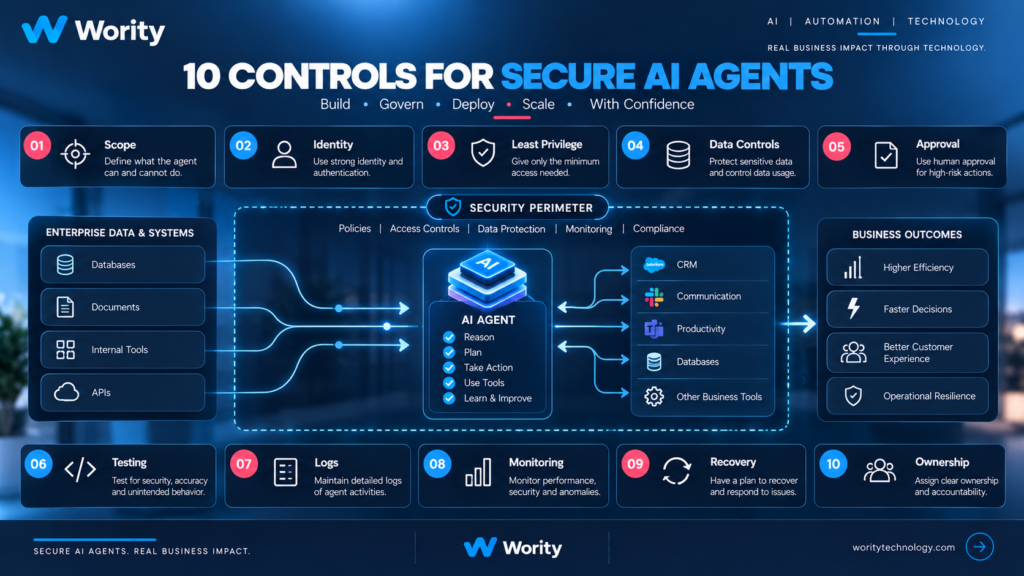
AI agents are becoming more capable of doing more than answering questions. Depending on how they are designed, they may retrieve information, call APIs, update records, draft communications, execute code, or coordinate multiple steps in a workflow.
That creates a different security question from a conventional chatbot.
A chatbot may return an inaccurate answer. An agent connected to business systems may also take an action based on that answer. The consequences depend on its permissions, the data it can access, the tools it can call, the workflow around it, and the safeguards that exist when something goes wrong.
The answer is not to avoid every AI agent. It is to design the system so that its authority is limited, its behaviour is tested, its actions can be understood, and the business can intervene.
This guide presents ten practical controls for teams planning to deploy AI agents. It is a starting point for risk assessment, not a substitute for a formal security review.
What makes AI agent security different?
An AI agent combines model-generated decisions with software tools and access to an operating environment. Risk increases when three conditions overlap: the system can read sensitive or commercially important information; it processes content that may be incorrect, misleading, or malicious; and it can take actions outside the conversation, such as updating a record or invoking an API.
A system can behave unexpectedly without an attacker. It may misunderstand the task, select the wrong tool, use incomplete information, repeat an action, or fail to stop when the workflow changes. Adversarial inputs can add another layer of risk.
NIST has highlighted the need to understand and improve the security of AI agent systems. OWASP’s 2026 Top 10 for Agentic Applications is another useful resource for teams identifying agent-specific threats. These sources should inform the risk assessment, but the right controls depend on the actual system.
Control 1: Define a narrow task
Avoid vague instructions such as “manage customer operations” or “handle sales follow-up.” Those descriptions make it difficult to determine whether an action is in scope.
Document the trigger that starts the workflow, the business outcome expected, the data sources the agent may use, the tools it may call, the actions it may take, the actions it must never take, the conditions that require escalation, and the person accountable for the workflow.
A narrow task is easier to test, monitor, and improve. It also makes it easier to decide whether an agent is even necessary.
Control 2: Apply least privilege
An agent should receive only the access needed for its task. If it only needs to read a CRM record, do not give it permission to delete or modify records. If it drafts an email, do not assume it also needs permission to send that email automatically.
Separate capabilities where possible: read data, draft a proposed change, submit a change for approval, execute an approved change, and administer the underlying system. This separation reduces the impact of unexpected behaviour. Review permissions when the workflow changes, not only when it is first deployed.
Control 3: Use a distinct identity and protect credentials
Where the architecture permits, give the agent a distinct service identity instead of reusing a person’s broad administrator credentials. The identity should be attributable, limited, and revocable.
Avoid putting secrets in prompts, source code, or logs. Store credentials in an approved secrets-management system. Scope access to the specific service and action. Prefer short-lived credentials where supported. Rotate and revoke credentials when required. Keep development, test, and production permissions separate.
The exact implementation depends on the technology stack. The principle is that the agent should not silently inherit more authority than the workflow needs.
Control 4: Treat external content as untrusted
Agents may read emails, documents, support tickets, web pages, code repositories, and tool outputs. Some content may contain instructions designed to manipulate the system.
Do not assume that text retrieved from a trusted business system is safe to treat as an instruction. Data and instructions should be separated. The workflow should make clear which sources can define policy and which sources are merely information to process.
Useful measures include defining trusted instruction sources, keeping user or document content separate from system policy, restricting tool access independently of model instructions, testing indirect prompt-injection scenarios, requiring approval for sensitive actions, and avoiding allowing retrieved content to expand permissions.
Prompt wording alone is not a complete security boundary. Enforce important restrictions in application logic and access controls.
Control 5: Set human approval boundaries
Not every action needs human approval. Requiring a person to approve every low-risk step can make automation impractical. But actions that are sensitive, high-impact, unusual, or difficult to reverse may need stronger controls.
For each approval point, define which action requires approval, who may approve it, what evidence the reviewer sees, what happens if approval is delayed or refused, whether the action can be reversed, and how the approval is recorded.
A vague “human in the loop” statement is not enough. The actual workflow must make review possible and meaningful.
Control 6: Evaluate before release
Test the agent against realistic scenarios, not just a few successful demonstrations. Include normal cases, ambiguous requests, missing or conflicting information, incorrect tool responses, permission-denied scenarios, malicious or misleading content, API timeouts, duplicate-action risks, human escalation, and recovery after failure.
Define pass/fail criteria before the evaluation. Record expected behaviour, observed behaviour, severity, and the decision. For high-impact workflows, a serious failure should block release until it is fixed or the risk is explicitly accepted by the accountable owner.
Control 7: Log actions and important decisions
Logs should help the team reconstruct what happened. Depending on the use case, record workflow and agent version, timestamp and correlation ID, tool invoked, permission context, approval decision, action result, error or timeout, escalation event, and final workflow outcome.
Do not blindly log all prompts, documents, or personal information. Logs themselves need access control, retention rules, and privacy review. The goal is useful traceability, not unlimited data collection.
Control 8: Monitor after deployment
Evaluation before launch cannot anticipate every production condition. Data, models, tools, users, and business rules change.
Monitor task completion and failure rates, tool-call errors, unusual retries, escalation frequency, permission denials, latency and operating cost, human correction or rework, user complaints, and unexpected changes in output quality.
Set thresholds based on the workflow. A sudden increase in failed actions or human corrections may be more meaningful than a generic model-quality score.
Control 9: Plan how to stop and recover
Every production workflow needs a way to pause or disable the agent. Depending on the system, recovery may also require revoking credentials, disabling a tool integration, preventing duplicate execution, reverting an incorrect change, escalating to a human operator, preserving relevant logs, informing affected stakeholders, and documenting corrective action.
Recovery should be tested. A control that has never been exercised may fail when it is needed most.
Control 10: Assign an owner
Every agent needs a named business owner and a technical owner. The business owner understands the process and accepts the operational outcome. The technical owner is responsible for the system’s implementation, monitoring, and maintenance.
Document who approves new tools and permissions, changes to prompts or workflow logic, model or vendor changes, new data sources, release to production, risk exceptions, and retirement of the workflow.
Ownership prevents the agent from becoming an unmaintained system that everyone uses but nobody is responsible for.
A practical rollout sequence
Stage 1: Observe
Start with a low-risk task. Allow the system to retrieve or summarize information without taking consequential actions. Compare outputs with a human baseline.
Stage 2: Recommend
Let the agent propose an action, but require a person to review and execute it. Capture corrections and failure patterns.
Stage 3: Execute within limits
Allow a narrow set of reversible actions under scoped permissions. Keep monitoring, audit records, and a clear stop mechanism.
Stage 4: Expand only with evidence
Add tools or autonomy only after the workflow meets agreed success, safety, and reliability criteria. Review the risk whenever the scope changes.
This is not a universal maturity model. It is a practical way to avoid giving a new system broad authority before its behaviour is understood.
The business case for security
Security controls are sometimes viewed as a cost that slows AI adoption. In practice, they can make adoption easier by clarifying ownership, reducing unnecessary access, making failures easier to investigate, and giving business leaders evidence about how the system behaves.
The right controls are proportional to the use case. An internal summarization workflow and an agent that can modify customer or financial records should not have the same risk profile.
Final checklist
Before deploying an AI agent, confirm that the task and boundaries are documented; access is limited to what is needed; credentials are protected and revocable; untrusted content cannot redefine permissions; approval rules are explicit; representative and adversarial tests are complete; logs support investigation without excessive data collection; monitoring and alert ownership are defined; a stop and recovery path exists; and a business owner and technical owner are named.
AI agent security is not a single product or prompt. It is a set of design and operating decisions made across the lifecycle.
For organisations exploring AI agents, Wority Technology recommends starting with the workflow, identifying the consequence of failure, and then designing the appropriate level of access, testing, oversight, and monitoring.
Considering an AI agent for an internal or customer-facing workflow?
Wority Technology can help structure the use case, map system boundaries, and define a practical path from prototype to controlled deployment. Contact us through the official Wority Technology website to discuss your workflow.
Visit us