
AI governance can sound like a large-company exercise involving committees, policies, and extensive documentation. For a small or mid-sized business, that perception can make governance feel too expensive to start.
But governance begins with practical questions:
Which AI systems are we using?
What are they being used for?
Who is responsible?
What data do they access?
What could happen if they are wrong?
How do we test them?
How do we respond when something goes wrong?
A small business does not need to copy the governance structure of a large enterprise. It does need a repeatable way to make decisions, assign responsibility, and match controls to risk.
This 30-day plan is a starting point. Adapt it to the organisation’s sector, jurisdiction, contracts, data, and use cases. It is not legal advice.
What AI governance means in practice
AI governance is the set of responsibilities, policies, processes, and controls used to guide AI systems throughout their lifecycle. It connects business objectives with data, technical design, risk management, evaluation, deployment, and ongoing monitoring.
NIST’s AI Risk Management Framework is a useful reference because it treats risk management as a lifecycle activity rather than a one-time approval. SMEs can use the principles proportionately without assuming they need a large compliance department.
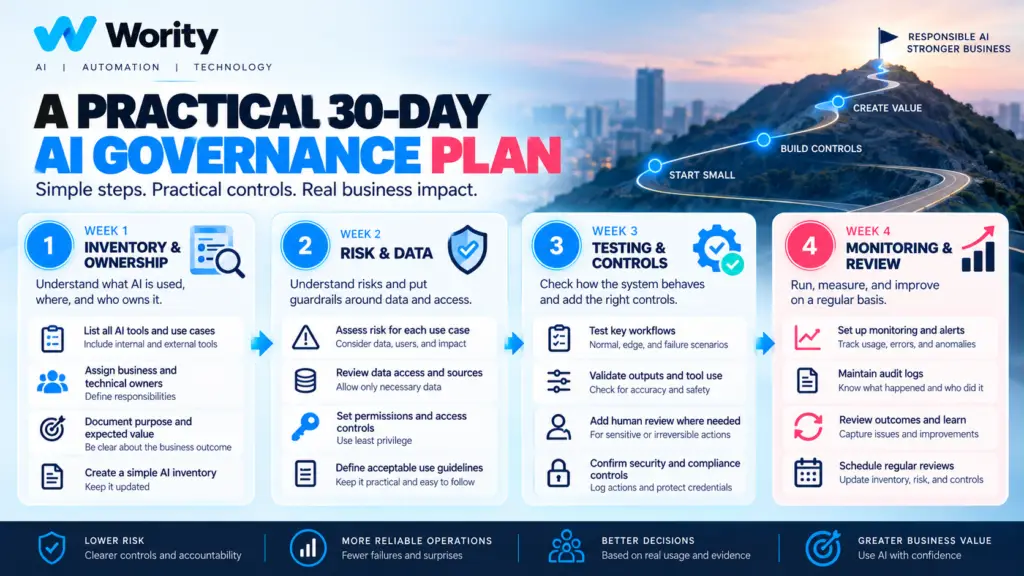
Week 1: Create an AI inventory and assign owners
Days 1–2: List the AI systems
Include formal projects and everyday tools used by employees. Record the system name, purpose, vendor, business team, data involved, users, and whether it can take actions.
Day 3: Identify the business owner
Every system needs someone accountable for its purpose and business outcome. Technical ownership may sit with a different person.
Day 4: Record the workflow
Describe how the system is triggered, what inputs it receives, what outputs it produces, and where humans are involved.
Day 5: Identify dependencies
Record connected applications, data sources, APIs, vendors, and important integrations. Note whether the system can read, write, send, delete, or approve anything.
Week 1 deliverable: a simple AI inventory with one business owner and one technical contact per system.
Week 2: Understand risk and data
Days 6–7: Classify impact
Ask what could happen if the system gives a wrong answer or takes the wrong action. Consider financial impact, customer impact, sensitive data, operational disruption, legal obligations, and reversibility.
Day 8: Map data access
List the data sources and categories involved. Identify sensitive information, retention expectations, and whether the vendor’s terms are suitable for the intended use.
Day 9: Review permissions
Check whether employees and agents have more access than they need. Separate read-only access from write access where possible.
Day 10: Define restricted uses
Document tasks that are not approved, tasks that require review, and actions that must not be automated without further assessment.
Week 2 deliverable: a proportionate risk register and data/access map for the most important systems.
Week 3: Add testing, approvals, and incident handling
Days 11–12: Define success criteria
Choose measures connected to the business goal. These might include task completion, error severity, time, cost, user acceptance, escalation, and human rework. Set a baseline before making improvement claims.
Days 13–14: Test representative cases
Include normal, ambiguous, missing-data, failure, and out-of-scope cases. For agentic workflows, test permission boundaries and tool failures.
Day 15: Define approval rules
Specify which actions require human review, who can approve, what information they see, and what happens if approval is denied.
Day 16: Create an incident path
Decide who receives reports, how the system can be paused, how access can be revoked, what evidence is retained, and how affected users are informed where appropriate.
Week 3 deliverable: a test record, approval matrix, and simple incident response procedure.
Week 4: Monitor, document, and improve
Days 17–19: Define monitoring
Track meaningful signals such as failure rates, tool errors, human corrections, escalations, latency, cost, and unexpected behaviour.
Days 20–21: Document limitations
Record known failure modes, unsupported tasks, data limitations, and circumstances that require a human.
Days 22–24: Train users
Explain what the system is for, what it is not for, how to verify outputs, how to report a problem, and when to use a human process instead.
Days 25–27: Review vendors and changes
Check relevant vendor terms, data handling, access controls, change notifications, and the organisation’s ability to export records or discontinue the service. Requirements depend on contract and jurisdiction.
Days 28–30: Run a governance review
Bring the owner and relevant stakeholders together. Review incidents, test failures, metrics, new use cases, and required changes. Record decisions and assign follow-up actions.
Week 4 deliverable: a simple governance record, monitoring plan, user guidance, and next review date.
A lightweight governance register
For each system, record its name and purpose; business owner; technical owner; vendor and model where known; data categories; connected systems; permission level; impact if wrong; required human approval; evaluation status; monitoring measures; known limitations; incident contact; last review; and next review.
This can begin in a controlled spreadsheet or internal document. Choose a format people will actually maintain.
How to prioritize when resources are limited
Start with systems that access sensitive or confidential data, can change records or trigger external actions, have material customer or financial impact, have broad user access, offer limited ability to reverse actions, have unclear ownership, or lack reliable testing and monitoring.
A low-risk tool used to summarize public information may need a lighter process than an agent that can update customer records or trigger a financial workflow.
Common mistakes to avoid
Treating governance as paperwork: documentation is useful only when it changes decisions and operating behaviour.
Applying identical controls to every use case: risk should determine the level of review and control.
Assuming the vendor owns every risk: a vendor may provide the model or platform, but the business still decides how it uses the system and what permissions it grants.
Measuring activity rather than outcomes: the number of AI calls or generated documents does not prove business value.
Forgetting change management: a model, prompt, tool, or data source can change after launch. Review important changes and re-test relevant controls.
Allowing shadow AI to remain invisible: employees may adopt tools informally. Create a practical route for declaring use, assessing risk, and approving suitable tools without making the process unnecessarily difficult.
How to know the first 30 days helped
At the end of the month, the organisation should be able to answer: Which AI systems are in use? Who owns each one? Which use cases carry the greatest risk? What data and tools can they access? Which actions require approval? How are they tested? What is monitored? How can a system be stopped? When will it be reviewed again?
The purpose is not to declare that every risk has been eliminated. It is to make the use of AI more visible, accountable, and manageable.
Conclusion
Good governance helps an SME adopt AI with clearer responsibilities and fewer surprises. Begin with an inventory, assign owners, understand data and impact, test the workflow, define approval rules, and establish monitoring and review.
Keep the process proportionate. Improve it as the organisation’s use of AI grows.
Wority Technology can help teams map AI use cases, identify workflow risks, and plan a practical path from experimentation to managed implementation.
Start with the systems and processes that matter most to your business.
Visit us